
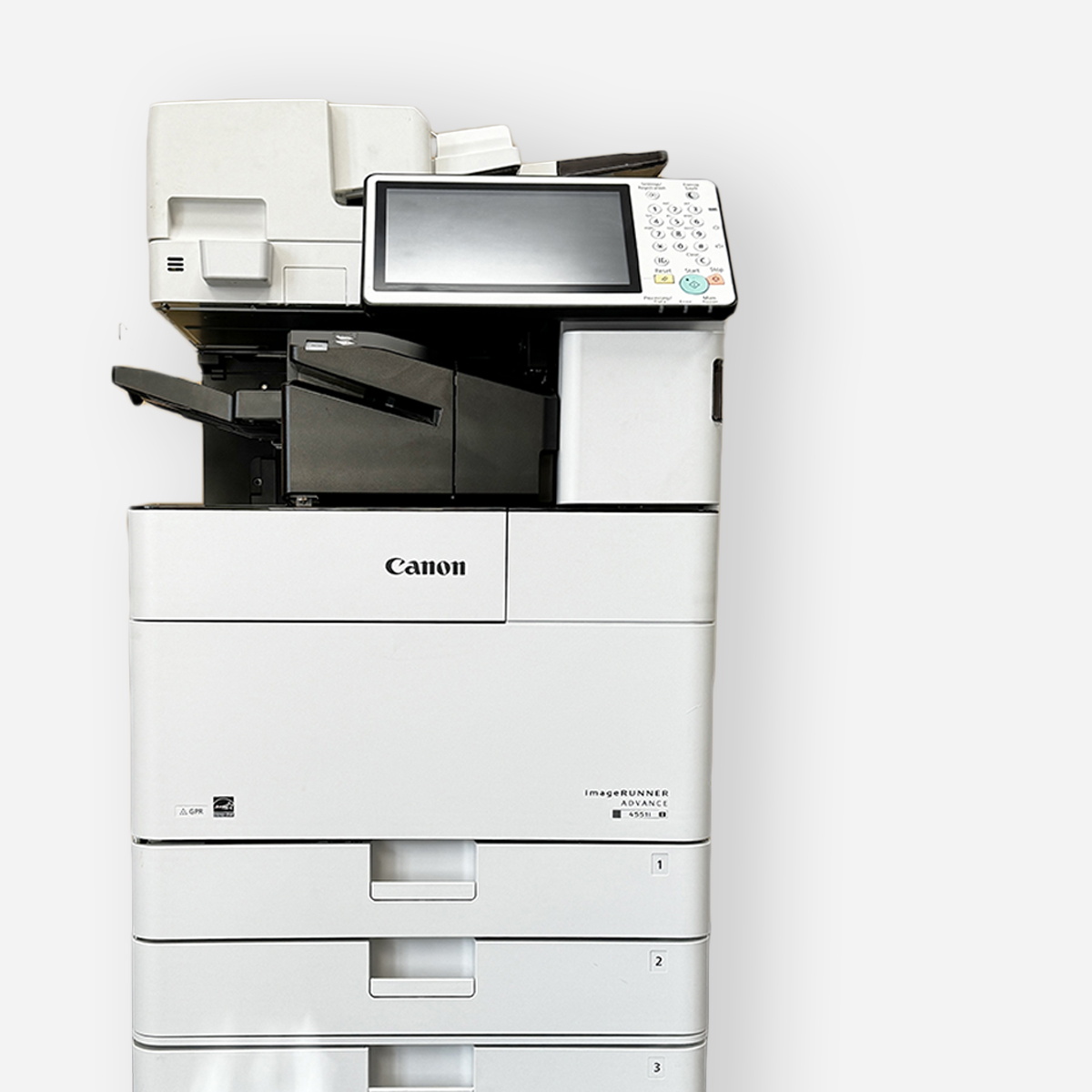
Key Highlights
- Boost productivity: Streamline tasks with an all-in-one printer that handles printing, scanning, and copying seamlessly.
- Find the perfect fit: From compact models for small offices to high-volume workhorses, discover the ideal printer for your needs.
- Embrace sustainability: Explore eco-friendly printing solutions with features like duplex printing and Energy Star certification.
- Stay connected: Enjoy flexible printing with wireless connectivity options, allowing you to print from laptops, smartphones, and tablets.
- Optimize your investment: Understand key factors like print speed, quality, and cost-per-print to make informed decisions.
Introduction
In today’s busy business environment, having a good printer is very important for small businesses and home offices. If you need to print documents, scan contracts, or make copies, a high-quality monochrome office printer scanner copier can really boost your productivity and simplify your work. This guide will give you the best choices for top office printer scanner copiers, including the convenience of a single printer. You will also find helpful tips to help you decide which one to buy.
Top Office Printer Scanner Copiers: Our Expert Selections
Choosing the best office printer, scanner, and copier can be challenging. There are many models out there. Each one has its own special features. To help you find the right one, we have made a list of top-rated printers. These stand out in different areas.
No matter if you care about print speed, cost, or being eco-friendly, our expert picks fit different needs and budgets. Read more to find the perfect office printer, scanner, and copier for you.
1. Versatile All-in-One Office Hub: The Ultimate Productivity Booster
The HP OfficeJet Pro series includes several all-in-one printers that are perfect for working in an office. For example, the OfficeJet Pro 9025e can print quickly, has great print quality, and comes with helpful features to boost your work.
These printers have an automatic document feeder (ADF) for easy scanning and copying of multiple pages. Duplex printing is also available to save on paper and cut costs. With wireless connectivity, you can print from different devices, making them great for today’s offices.
Whether you want to print high-quality documents or scan important papers, the HP OfficeJet Pro series provides great performance and dependability.
2. Compact Powerhouse: Best for Small Workspaces in Minneapolis-St. Paul
For small businesses and home offices in the busy Twin Cities, space is often limited. Compact laser printers, like the Brother HL-L2350DW, are a great choice. Don’t be fooled by their small size. These printers are strong in performance and efficiency.
The Brother HL-L2350DW has Energy Star certification, which saves energy. It uses toner cartridges that print many pages before needing a change. With fast printing speeds and clear text quality, they are ideal for daily printing tasks.
3. Eco-Friendly Efficiency: Leading the Way in Sustainable Printing
In today’s world, people are more aware of the environment. It is very important to use sustainable printing practices. Epson’s EcoTank series is a leader in eco-friendly printing solutions, making it a top choice for small businesses. These printers are unique because they don’t use cartridges. Instead, they have large ink tanks that help cut down on ink waste and produce high-quality graphics.
These printers also include automatic duplex printing. This feature helps save paper, which supports the values of being eco-conscious. The Energy Star certification makes sure they are energy efficient, helping create a greener workplace.
When you choose an Epson EcoTank printer, you help the environment. You also get to save money in the long run because of lower ink use.
4. High-Volume Hero: Ideal for Busy Offices with Heavy Print Loads
For businesses that need a lot of printing, high-volume laser models like the HP LaserJet Pro M404n are a perfect choice. These printers are built to handle large print jobs easily and provide fast and efficient results.
Toner cartridges that have a high page yield ensure smooth printing without interruptions. Their high monthly duty cycles promise lasting use, even in busy settings. Their strong build and advanced paper handling features make them great for big offices with high printing demands.
5. Budget-Friendly Workhorse: Top Value without Compromising Performance
Finding the right mix of low cost and good performance is important for businesses on a budget. The Canon PIXMA TR4520 gets it just right with its user-friendly interface and mobile app. It offers great value and keeps the key features you need, including the ability to print vibrant graphics and smoothly shaded gradients. This inkjet printer gives you high-quality prints for both documents and photos, making it a handy option for many printing tasks with the added convenience of free shipping on eligible orders.
Its small size and wireless options help it fit easily into any workspace. With its low price range and dependable performance, the Canon PIXMA TR4520 shows that you don’t need to spend a lot of money for a good printer.
6. Creative Companion: Unmatched Quality for Marketing Materials
For businesses that need high print quality, especially for marketing and presentations, a color laser printer like the HP Color LaserJet Pro M255dw is a great option. These printers offer bright colors and clear details, enhancing your marketing materials.
They come with smart color management tools and can work with different types of paper. You can make professional brochures, flyers, and presentations right in your office. Their quick print speeds and steady output quality are vital for businesses that depend on strong marketing materials.
7. Tech-Savvy Solution: Smart Features for the Modern Workplace
In today’s tech-focused world, it’s very important to have easy connections. Modern printer scanner copiers have many ways to connect to make your work easier.
Look for printers that have built-in wireless options (Wi-Fi), Ethernet for safe wired links, and USB ports for direct printing. These features give you the freedom and ease to connect your printer to different devices without any hassle.
8. Robust and Reliable: Engineered for Durability and Longevity
Investing in a strong and dependable office printer, scanner, and copier is very important for long-term productivity. When picking a printer for a large office, it helps to choose models known for their durability.
Look for good construction, quality parts, and positive feedback from customers about reliability. A printer designed to handle the busy demands of an office will reduce downtime and provide steady performance.
9. Ultra-Fast Speedster: Keeping Pace with High-Speed Business Needs
Time matters a lot in busy business settings. If you work in a large office that needs quick printing, think about printers with high pages per minute (PPM) ratings.
Choose models that can print the first page fast. This cuts down the wait time for each print job. A speedy printer can boost your efficiency. It helps you manage large print amounts quickly and meet short deadlines.
10. Wireless Wonder: Seamless Connectivity for Flexible Office Setups
Modern offices focus on flexibility and teamwork. Wireless printers are very important in these workspaces. With wireless connection, you can place your printer in the best spot in your office. You don’t have to worry about being stuck to a router or Ethernet cable.
This freedom helps you make the most of your workspace and supports better teamwork. Choose printers with strong wireless features to enjoy easy connection.
Navigating the Features: What to Look for in Your Next Office Printer
With so many office printer scanner copiers to choose from, it helps to know what features to look for. Start by thinking about your printing needs. Consider how much you will print, what types of documents you need, and the print quality you want.
Also, think about the print speed (PPM), how clear the print resolution (DPI) is, how it handles paper, and the types of connections it offers. Looking at these factors will help you pick a printer that fits your needs well.
Understanding Printer Technology: Inkjet vs. Laser
When choosing a printer, one key decision is the type of printing technology: inkjet or laser.
- Inkjet printers are usually cheaper. They also make high-quality color prints. This makes them a good choice for businesses that need bright marketing materials or want to do photo printing.
- Laser printers are fast and efficient. They are best for printing a lot of documents quickly. Even though laser printers are more expensive to buy at first, they generally cost less per page over time.
Think about your printing needs and budget when deciding between an inkjet or laser printer. Each type has its own benefits. Knowing what they can do will help you make the right choice.
Evaluating Print Speed and Quality: What Matters Most
Print speed and quality are very important to think about. They affect how productive you are and how people see your business. Print speed is measured in pages per minute (PPM). A higher PPM means your printer can finish jobs faster, which is good for printing many pages.
Print quality is shown in dots per inch (DPI). A higher DPI means your prints are sharper and clearer. If you print high-resolution images often or need photo printing for your business, choose a printer that has a higher DPI.
By looking closely at your needs for print speed and quality, you can find a printer that works well for your business and provides professional results.
Connectivity Options for the Minneapolis-St. Paul Office: Beyond Wi-Fi
Seamless connectivity is key for a productive workplace. Today’s office printer scanner copiers provide more choices than just traditional Wi-Fi.
Using Ethernet gives a steady and safe wired connection. This is great for large files or many users. USB ports let you print directly from laptops or other devices. This is handy when wireless options aren’t working.
Think about the connectivity needs of your Minneapolis-St. Paul office. Choose printers that give you different options to work well with many devices and network setups.
The Importance of Eco-Friendly Printing Solutions
As businesses work to be kinder to the environment, using eco-friendly printing solutions is very important. Check for printers that have Energy Star certification. This means they meet tough energy-saving standards.
Pick models that come with duplex printing as a standard feature. This allows for double-sided printing, which helps cut down on paper use. By choosing green printing methods and eco-friendly printers, businesses help create a healthier planet.
Embrace sustainable ways and lessen your impact on the environment while keeping quality and efficiency high.
Deciphering Duty Cycles and Monthly Volume: Planning for Capacity
Understanding a printer’s duty cycle and suggested monthly volume is important, especially for big offices that print a lot. The duty cycle shows the maximum pages a printer can handle each month without hurting its lifespan.
The suggested monthly volume gives you a better idea of how the printer should be used. If you print more than this amount for a long time, it can put stress on the printer and may reduce its lifespan.
By matching your printing needs with the printer’s duty cycle and suggested monthly volume, you can help the printer last longer and avoid any performance problems.
Making the Most of Your Office Printer: Usage Tips and Maintenance
Once you buy a good office printer, scanner, and copier, you need to use it correctly and take care of it. This helps it work better and last longer. Get to know the printer’s settings. Look for options like duplex printing to save on paper.
Make sure to clean the printer inside and out regularly. This stops dust from building up, which can hurt print quality. By following these easy tips, you can keep your printer working well and make it last.
Optimizing Print Settings for Maximum Efficiency
Unlocking what your office printer can do starts with learning about its print settings. You can customize these settings to help you work better. For instance, try duplex printing. It reduces paper use while still keeping things easy to read.
Change the print quality based on what you are printing. Using a lower DPI setting for drafts can save ink or toner and still keep the document readable. By adjusting these settings, you can improve how your printer works and cut down on waste.
Try different print settings to find the right mix of quality and efficiency that suits your printing needs.
Regular Maintenance Tips to Extend Printer Life
To make your office printer last longer, you need to take a few steps for maintenance. First, set up a regular cleaning schedule. Use a soft, lint-free cloth to clean both the outside and inside of the printer. Don’t forget to clean the paper tray and the output area too.
Keep an eye on the signs that show when to replace the toner cartridge. It is best to avoid using generic or refilled cartridges. They can lower the print quality and might even harm the printer. By following the maintenance tips from the manufacturer, you can avoid expensive repairs and help your printer last more years.
Troubleshooting Common Printer Issues: DIY Fixes
Experiencing printer issues sometimes is normal. Many of these problems can be fixed with simple do-it-yourself (DIY) methods. Before you call for help, try to fix the issue yourself. Check for easy problems like paper jams, empty ink or toner cartridges, or issues with connectivity.
Look at the printer’s user manual for help with specific error messages. You can also check online forums and knowledge bases for possible solutions. By learning some basic troubleshooting steps, you can usually fix small issues fast.
Enhancing Security in Your Printer Setup
In our connected world, keeping your printer safe is very important. This is especially true for businesses that deal with private information. You can protect your printer from unwanted access by using a password and encryption for wireless networks.
Make sure to update the printer’s software often. This helps you get the latest security updates. You might also want to set up user authentication. This way, you can limit access to sensitive print jobs and features.
Beyond Printing: Exploring Additional Functions of Modern All-in-Ones
Modern office printer scanner copiers are more than just printers now. They are all-in-one devices that help with many office tasks. Besides printing, you can use your printer for scanning, copying, and even faxing.
These features can help you get more done by combining many devices into one small unit. Use your all-in-one printer to make managing documents easier.
Scanning to Cloud Services: Streamlining Document Management
Modern office printer, scanner, and copier devices now have better scanning features. These functions help you manage documents more easily. Look for printers that let you scan documents directly to cloud services. This way, you can digitize and save essential files safely.
With this feature, you won’t have to file papers by hand. You can access your files from anywhere there is internet. Adding cloud scanning to your daily work can improve security and make teamwork easier.
Advanced Copying Features: From ID Card Copying to Duplexing
Modern all-in-one printers do more than just basic copying. They have advanced features that can be very helpful in different office situations. One useful feature to check for is ID card copying. This lets you copy both sides of an ID card on one sheet of paper easily.
Another great feature is duplex copying. This allows you to copy on both sides of the paper. It helps save paper and makes your documents look more professional.
The Evolution of Fax: Using Fax in Today’s Digital Age
Even though email and digital communication are popular in business today, fax is still important in some industries and for certain types of documents. Some all-in-one printers still allow you to send and receive faxes straight from the device.
If your business needs to use fax, look for printers that come with built-in fax modems. Features like speed dialing and fax forwarding can make things easier. Adding fax features to your all-in-one printer can help improve communication.
Cost Considerations: Finding the Balance Between Price and Performance
The first price you pay for a printer matters. But you also need to think about how much you will spend on ink or toner later. Some printers may be cheap to buy but use costly ink cartridges. This can make your overall costs go up over time.
Check the cost per page for both black and color printing. This will help you make smart choices that fit your budget. Finding a balance between the price and how well the printer works will help you make the most of your money.
Initial Purchase Price vs. Long-Term Costs: What to Expect
When you buy an office printer, scanner, or copier, you should think about more than just the first price. It’s important to look at the long-term costs too, including the cost of aio options. A printer that is cheap at first might end up costing you more later. This is often because of high costs for ink or toner.
To understand the total cost of ownership (TCO), add up the starting price, the estimated costs for ink or toner over time, and any repair or maintenance costs. By looking at these long-term costs, you can better judge how affordable the printer truly is.
Ink or Toner Expenses: Cutting Costs without Cutting Corners
Ink and toner costs are a big part of owning a printer over time. You can find budget-friendly choices that still give you good print quality. Look for printers that use high-yield ink or toner cartridges. These can help you change your cartridges less often and lower your cost for each page you print, including color pages. Additionally, when considering the pricing of a printer, it is important to factor in the expense of replacement ink or toner cartridges. By choosing a printer with affordable replacement ink, you can save money without sacrificing print quality.
Some printers also have ink subscription services. These services give you regular ink at a lower price. Be sure to look at these options to find what fits your printing needs and your budget best.
Warranty and Support: What Minneapolis-St. Paul Businesses Need to Know
A reliable warranty and responsive customer support provide peace of mind, knowing you have assistance if issues arise. Check the warranty coverage period and what it entails, such as repairs, replacements, or technical support.
|
Feature |
Description |
|
Warranty Period |
The duration of warranty coverage provided by the manufacturer. |
|
Coverage |
Specific aspects covered under warranty, such as parts, labor, or technical support. |
Consider the level of customer support offered by the manufacturer, including phone, email, or live chat options. Responsive customer support can prove invaluable in resolving technical issues quickly and efficiently.
Conclusion
In conclusion, choosing the right office printer, scanner, and copier is important for improving work productivity and efficiency. Our expert selection offers different options that meet various business needs. By looking at important features, checking performance, and considering costs, you can make a smart choice. Remember to focus not just on what works now, but also on long-term sustainability and support. Investing in a reliable and flexible office system will help streamline your work and keep your business running smoothly in Minneapolis-St. Paul. Use modern technology to boost your office setup and stay competitive today.
Frequently Asked Questions
What are the key features to look for in an office printer for a Minneapolis-St. Paul business?
For a business in Minneapolis-St. Paul, it is important to focus on some key features for your office printer. Look for wireless connectivity, an automatic document feeder (ADF), duplex printing, and good print quality. These features will help make your printing tasks easier and more efficient.
How do I decide between an inkjet and a laser printer for office use?
When you think about print volume and cost, there are important differences. Inkjets provide better print quality for photos and cost less upfront. On the other hand, laser printers are faster, have lower running costs, and produce sharper text.
Can all-in-one printers really save money for my business?
All-in-one printers are great because they combine printing, scanning, and copying. This means you don’t need different devices. They save space and usually cost less than buying each machine separately.
What are the security considerations when choosing an office printer?
Make network security important. Use password protection, encryption, and user authentication. This will help keep confidential information safe and stop unauthorized access.